Service Transition & Readiness helps you decide whether a service is ready to go live, then track it through the first weeks of production support.
It answers three questions that usually live in scattered spreadsheets:
- Is this service ready? A weighted readiness assessment against a template your organisation defines.
- Did someone actually decide? An immutable gate decision — Go, Conditional Go or No-Go — recorded with the score it was made on.
- Did it survive contact with production? An early-life support (ELS) period with exit criteria and an incident trend, ending in a signed handover to business as usual.
The lifecycle
  Create service  →  Assess readiness  →  Gate decision  →  Transition plan
        │                                                          │
        └──────────────────────  Early-life support  ──────────────┘
                                        │
                                Handover sign-off → Live
There are five statuses: Planning, In transition, Early-life support, Live and Archived.
Only three actions move the status automatically:
| Action | Status becomes |
|---|---|
| Starting a readiness assessment on a service in Planning | In transition |
| Starting an ELS period | Early-life support |
| Recording the handover sign-off | Live |
Creating a transition plan and recording a gate decision do not change the status. Archiving is the one status you set deliberately.
Where the app appears in Jira
The app adds four surfaces. Note that what you look for in a menu is not always what the page calls itself once you are on it:
| Where to look | Menu entry | Page heading | For |
|---|---|---|---|
| Project sidebar | Service Transition & Readiness | Transition Hub | The services in this project. Your day-to-day screen. |
| Apps menu, top navigation | Transition Portfolio | Transition Portfolio | Every service across the whole site. Reporting. |
| Jira Settings → Apps | Service Transition & Readiness | Service Transition & Readiness | Templates and defaults. |
| Any Jira issue, via the app’s button | Service Readiness | — | Read-only readiness summary, added above the Activity section. |
Service Readiness is available on every Jira issue, but it is not displayed until someone clicks the app’s button in the issue actions — it is then added above the Activity section, not in the right-hand column. On an issue with no service linked it says so and offers a button into the hub.
Anyone who can reach the admin page can read it. Only Jira administrators can save changes there; everyone else sees a banner and read-only controls.
Vocabulary
Service — the thing being transitioned. Not a Jira project; usually one application, platform or capability.
Readiness template — the criteria a service is judged against, grouped into categories, each criterion carrying a weight. Templates are versioned: editing one creates a new version, and an assessment stays pinned to the version it started with, so a score can never shift under a decision that was already made.
Criterion weight — how much a criterion counts, 1 to 10. A weight-5 criterion moves the score five times as much as a weight-1 one.
Readiness score — the weighted percentage across every criterion. Each criterion is scored in five steps: 0%, 25%, 50%, 75%, 100%. A criterion nobody has scored counts as 0%, not as “unknown” — so an untouched assessment reads 0%.
RAG band — the colour on that score. By default: red below 60%, green at 85% or above, amber between. A site admin can change both thresholds (see 01 · Admin setup).
Gate decision — the go/no-go, recorded against a specific assessment score. Gate decisions are immutable: they cannot be edited or deleted, only superseded by a later decision. That is deliberate — the history is the audit trail.
Transition plan — phases and tasks. Plan health is derived, never set by hand, and is evaluated in this order:
| Health | When |
|---|---|
| Done | The plan has at least one task and every task is done. |
| Late | Any task is overdue, or the target go-live has passed with work still open. |
| At risk | Any task is blocked. |
| On track | None of the above — including a plan with no tasks yet. |
Because the checks run in that order, an overdue task outranks a blocked one: a plan with both reads Late.
Plan health is stored on the service and recalculated whenever the plan or one of its tasks is saved. It is not recalculated on a timer, so a target date that passed overnight shows up the next time someone touches the plan.
Early-life support (ELS) — the hypercare period after go-live, with a start and end date, exit criteria, and a daily incident count drawn from a JQL query you supply. ELS can only be started once the service has a Go or Conditional Go gate decision.
Licensing
When the app licence is inactive the app becomes read-only: every screen still loads and every number is still visible, but nothing can be saved. A banner explains why.
Nothing you have already entered is deleted while a licence lapses. One thing does pause: the daily incident snapshot stops running, so the ELS trend has no rows for those days. Refresh trend backfills up to 60 days once the licence is restored.
Appearance
The Transition Hub, Portfolio and Admin screens each have a theme switch in the header. It cycles through three modes:
- Match Jira (the default) — follows whatever theme Jira is using.
- Light — pinned light, whatever Jira is doing.
- Dark — pinned dark.
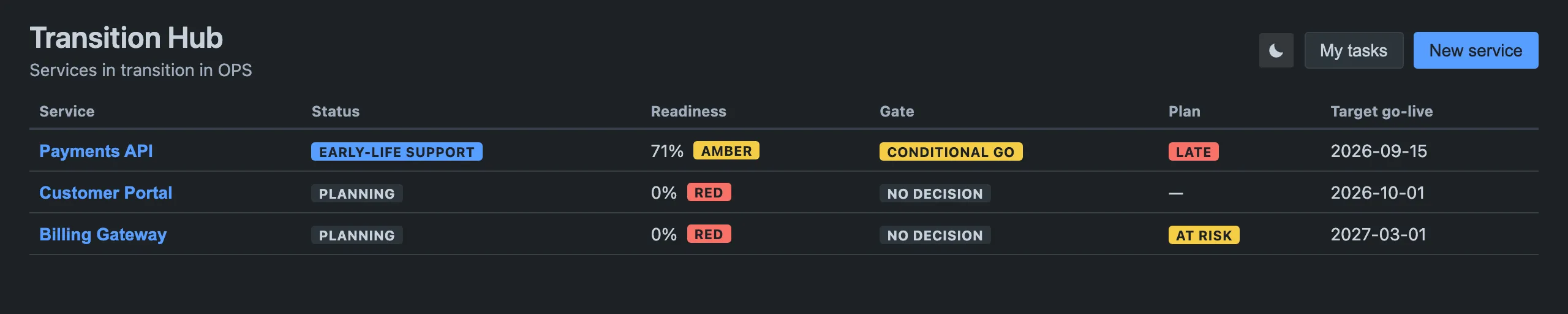
The choice is remembered in your browser, so it does not follow you to another machine and does not affect anyone else. The issue panel has no switch — it always follows Jira’s own theme.
Accessibility
The app is operable without a mouse. Tab reaches every control, arrow keys move
between tabs, Esc closes any dialog, and every table header, form field and
chart carries a text description. The incident trend chart has a Show data
table toggle that reveals the same numbers as text.
If you use prefers-reduced-motion, the app honours it: transitions are
suppressed and the loading spinner stops rotating.